

Vault structure
CtrlPortals draws portals and dashboards over the vault as it already is. Only two sections of its configuration name vault structure for the whole application: Employee configuration and Comment configuration. Both are optional. While either is missing, the application status in M-Files Admin shows a warning recommending it, and portals still load.
Every other setting that names an object type, class or property picks it from what the vault already has, while you configure one portal, dashboard or component. See Chosen per element.
Employees
Section titled “Employees”An employee object stands for a person and points at the M-Files user account they sign in with. CtrlPortals uses it wherever it needs to know who the current user is:
- Comments: a link from the author’s name to their employee object, and their picture when Image property is set, on any comment. For comment objects, also who wrote a comment and who may edit it.
- Calendar event types whose personal relationship points at employee objects.
- List views grouped by the current employee object.
- Multi view searches limited to items that refer to the current employee.
- Plot conditions and SQL parameters that take their value from the current employee.
- Columns holding a user account, in list views and plot tables, which show the person’s employee object instead. A column with several users, such as Assigned to, then shows only the first.
If you use none of these, you do not need employee objects. @-mentions still need this section for its Cache Update Frequency (below), and once the section is there, its Object type and User property have to be filled in. Many vaults already have an object type for people, such as Employee in the M-Files sample vault. Use it rather than creating another.
| Setting | Vault item | Needed | What it holds |
|---|---|---|---|
| Object type | Object type | Yes | The object type for people. |
| User property | Property Lookup or multi-select lookup | Yes | A lookup to the built-in Users list, on the employee object type: the account the person signs in with. A single lookup is the safe choice. |
| Image property | Property Text or multi-line text | Optional | The picture shown beside the person’s comments, as base64 text: a PNG or JPEG, or a complete data:image/ URI. Nothing else uses it. |
Each user account should have exactly one employee object pointing at it. If two do, CtrlPortals uses one of them without warning. A user with no employee object is remembered as having none for an hour, so a new employee object can take that long to be recognised.
The section’s Cache Update Frequency is not vault structure, but @-mentions depend on it. It is what fills the list of users that @-mention search reads, and until it has run, typing @ finds nobody. Whatever its help text says, it has no default: until you set it, it never runs. Set it to run at an interval, for example every hour. The User Cache Update operation on the application’s dashboard in M-Files Admin fills the list once, by hand. See Employee objects.
Comments
Section titled “Comments”The Comments component works without any of this. It then shows the object’s M-Files version comments. Adding a comment checks the object out and in with that comment, which creates a new version. Replies and editing are not available. With employee configuration, a version comment’s author name opens their employee object, and their picture shows when Image property is set.
With a comment object type, each comment is an object of its own, recorded against its author’s employee object. That gives replies, one level deep, and editing your own comments. Comment objects need both sections, and an employee object for the person commenting. A user without one still sees the whole thread, but their new comments are saved as version comments, and they get no Reply or Edit links.
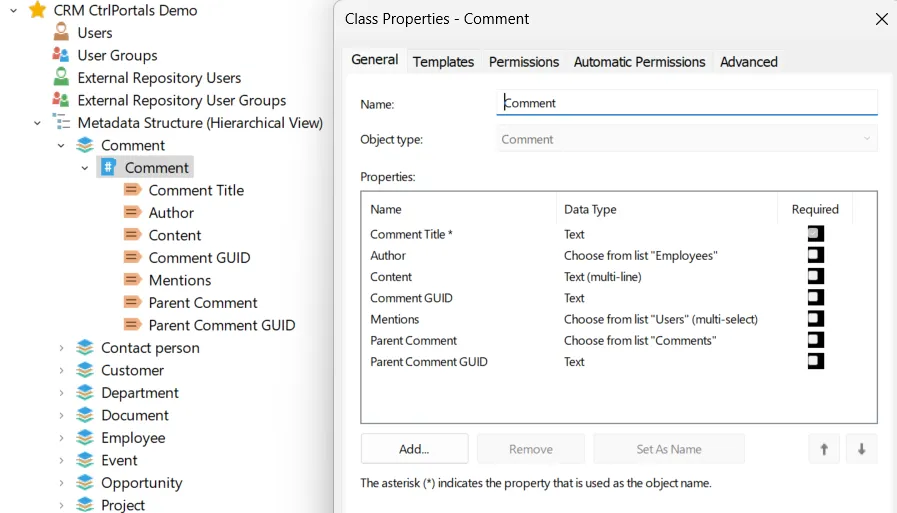
Create an object type for comments, with one class, and these properties on the class:
| Setting | Vault item | Needed | What it holds |
|---|---|---|---|
| Object type | Object type | Yes | The object type for comments. |
| Class | Class | Yes | The class new comment objects are created in. |
| Author property | Property Lookup or multi-select lookup | Yes | A lookup to the employee object type: who wrote the comment. |
| Content property | Property Multi-line text | Yes | The comment text. |
| GUID property | Property Text | Yes | The comment’s own identifier. CtrlPortals fills it in; hide it from the metadata card. |
| Parent GUID property | Property Text | Yes | On a reply, the identifier of the comment it answers. CtrlPortals fills it in; hide it from the metadata card. |
| Parent object property | Property Lookup or multi-select lookup | Yes | On a reply, a lookup to the comment object it answers. |
| Mentions property | Property Multi-select lookup | For @-mentions | Who a comment mentions: a multi-select lookup to the Users list or to the employee object type. Without it, a comment that mentions someone else cannot be posted. |
The seven marked Yes work as a set, and M-Files Admin does not point out a gap. Until all of them are filled in, the Comments component shows only version comments. Posting does not wait for the set, though: a comment or reply from a user with an employee object then fails, or is saved as a comment object that the thread never shows. Fill in all seven before anyone comments.
Two further parts of comment configuration are optional:
- Object-type Relationships choose, per object type and class, which property on a comment points at the object it is about, and a named access control list for the comment. Without them, a comment points at its object through the property M-Files uses to refer to objects of that type.
- Notifications e-mail the people mentioned in a comment, once Enabled is turned on; it is off by default. They also need e-mail settings, either the server’s SMTP or the application’s own SMTP configuration, and each recipient needs an e-mail address on their M-Files login account.
Chosen per element
Section titled “Chosen per element”Every other setting that names an object type, class, property, view, workflow state or user group picks it from the vault while you configure one element. Nothing has to exist in advance for an element you do not use. A setting marked required is required only within its element.
Each element’s page lists what it picks, directly or through the settings pages it links to, with the data type each setting accepts:
- Portals: the classes a portal opens for.
- Dashboards: the views that open them.
- Dashboard groups: the user groups a group of dashboards is for.
- Calendar: per event type, an object type and optionally a class, a timestamp property for the start and optionally one for the end, and optional yes/no, real-number and lookup properties. A start property of the Date type makes every event all-day. On a portal, the event object type also needs a lookup to the portal’s object, picked as Direct Relationship; without it the calendar shows every event of the type. If the vault does not record events yet, this is where new structure is most likely to be needed.
- Plot and Plot view: the object types and classes to chart, and the properties for labels, series and values, with numeric properties for values.
- List view: a view, and properties to group by.
- Multi view: views and searches, and the properties shown as columns.
- Form and HTML: the properties to show.
- Workflow steps: workflow states.
- Header segment and Column segment: the properties shown as header and sub-header.
- If you configured employees: each user account that uses CtrlPortals has exactly one employee object pointing at it.
- If you configured comments: signed in as a user who has an employee object, post a comment on a test object. It is created as an object of the comment class, not as a new version of the test object. Reply to it, and the reply appears beneath it. If that employee object is new, allow up to an hour and reopen the portal first.
- If you configured comments: the two GUID properties are hidden from the metadata card.
- If people will @-mention each other: typing @ and at least three letters of a colleague’s name in a comment lists matching users.
Set up CtrlPortals — step three, building the first dashboard.