

Follow a calendar through the demo vault
This walks a single meeting through the demo vault, from the sales opportunity it belongs to through to seeing it on three different calendars. It is the fastest way to understand what a calendar is for before configuring one.
Nothing here changes the configuration. The event type configuration behind the demo is at the end, so the same set-up can be reproduced in another vault.
Before you start
Section titled “Before you start”- The CtrlPortals demo vault, signed in as Tina Smith (
TinaS). - Nothing else. This example uses what the demo vault already has.
-
Create an opportunity.
The story: a promising conversation with Jeff Smith at A&A Consulting, who is interested in the CtrlPortals calendar. Create an
Opportunityfor it.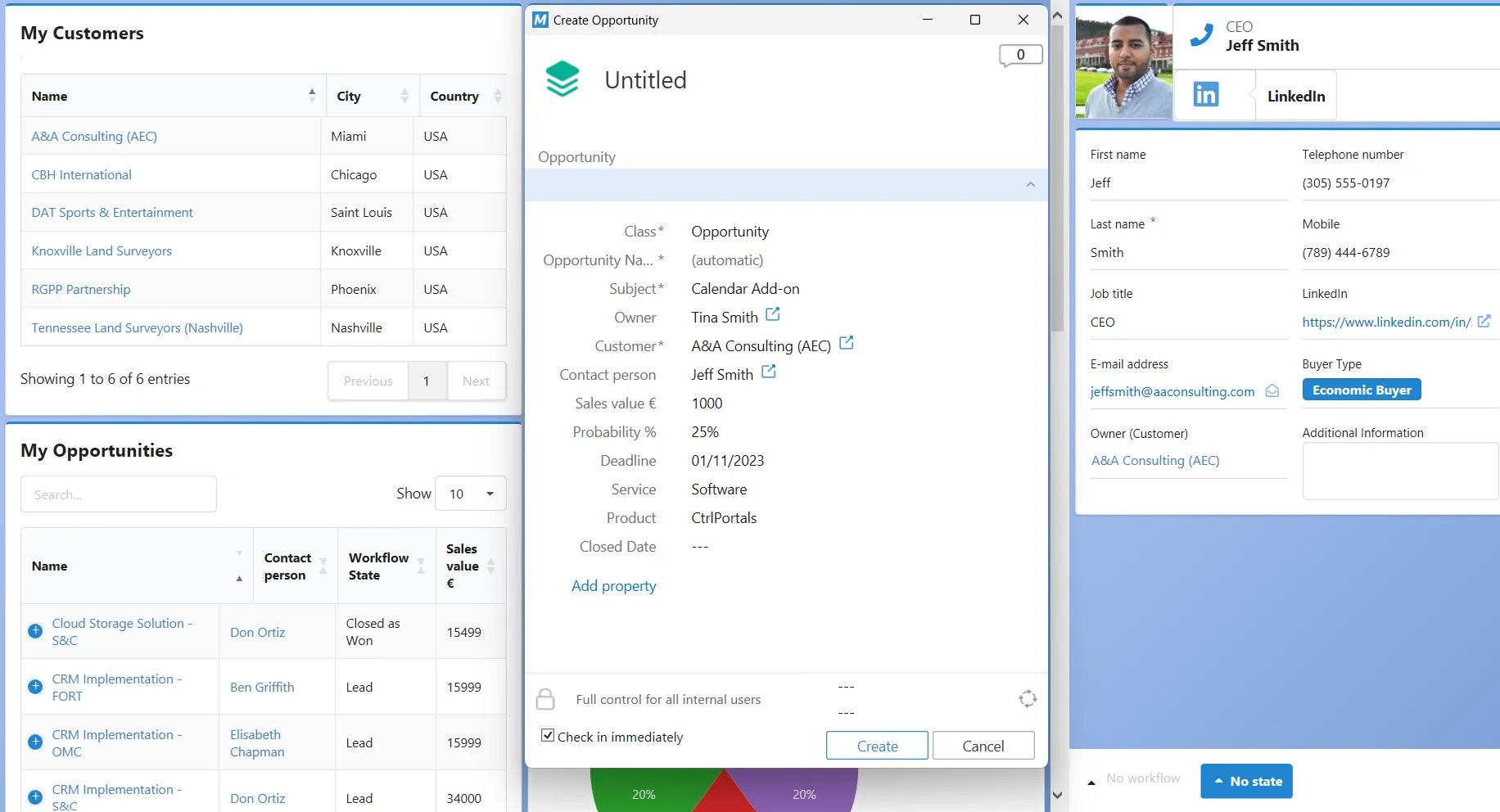
A new opportunity for Jeff Smith at A&A Consulting. Open it and look at how the portal presents it — the same object, laid out for reading rather than as a metadata card.
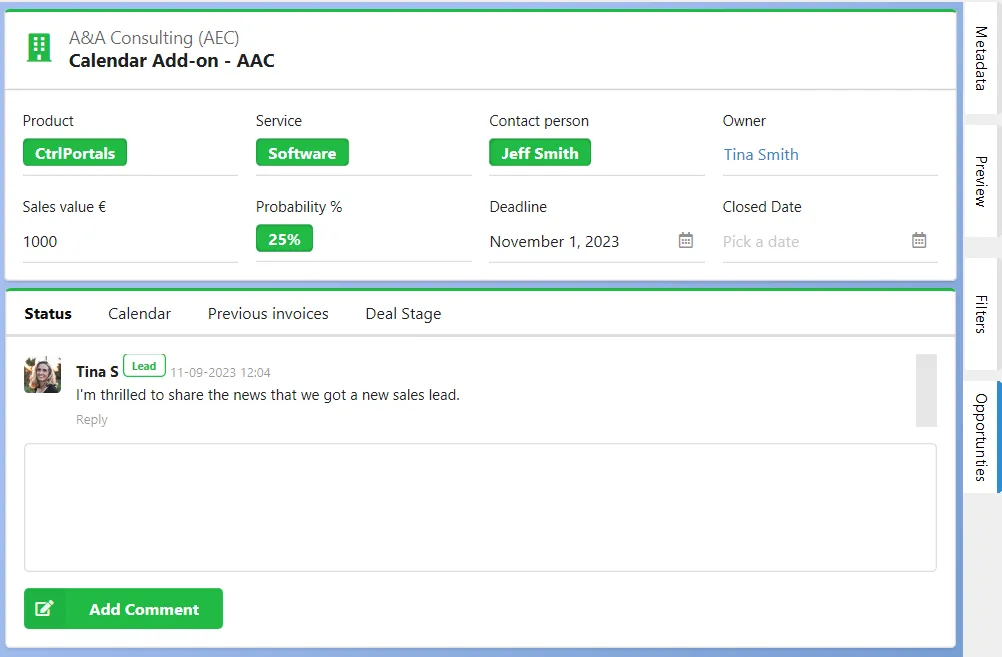
The opportunity seen through its portal. -
Schedule a meeting on it.
Open the Calendar tab on the opportunity portal, click a day, and choose the Opportunity Event type.
Fill in the meeting details. The Employee property takes several people, which is what puts the event on each of their calendars as well as on the opportunity’s.
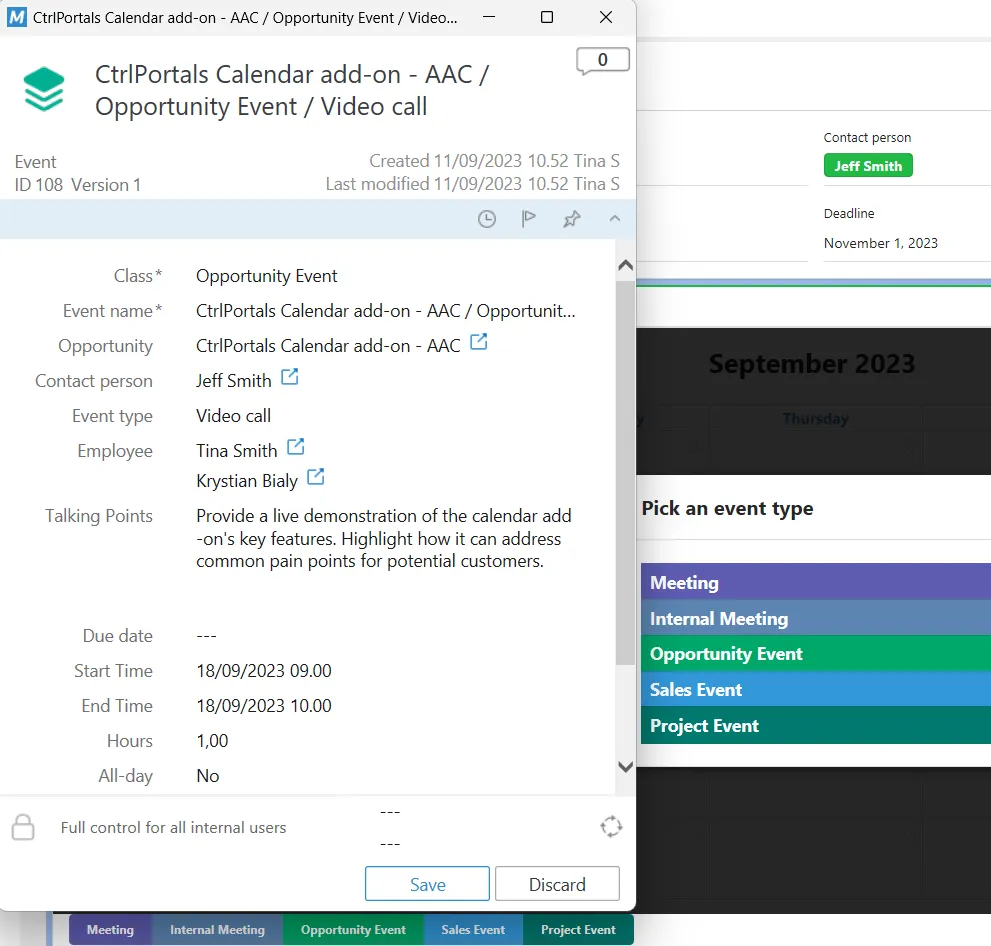
Creating an opportunity event, with the signed-in user and a colleague on it. -
Find the same event from somewhere else.
Search for Krystian Bialy and open his employee portal, then its Calendar tab. Open the My Calendar dashboard alongside it.
The event appears on all three — the opportunity’s calendar, the colleague’s calendar, and your own — because each is the same objects filtered differently. Side by side, this is how a free slot gets found.
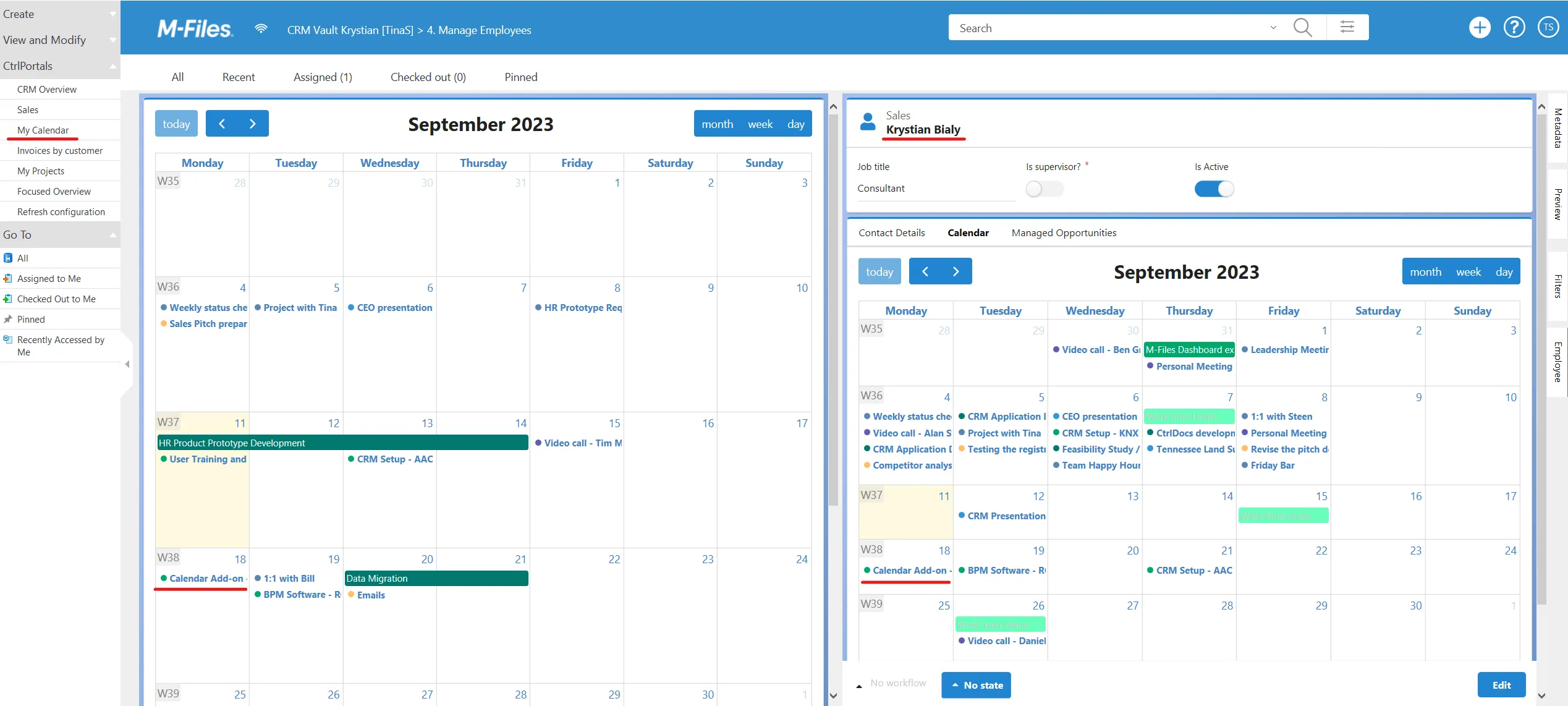
The same event on a colleague's calendar and on My Calendar. -
Look at how the event type is configured.
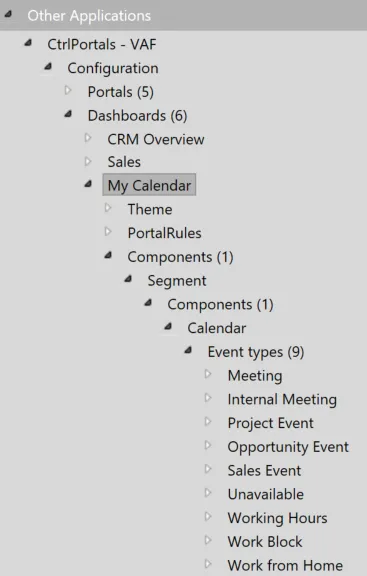
In M-Files Admin, expand the calendar component’s Calendar section, open its Event types list and find the opportunity event.
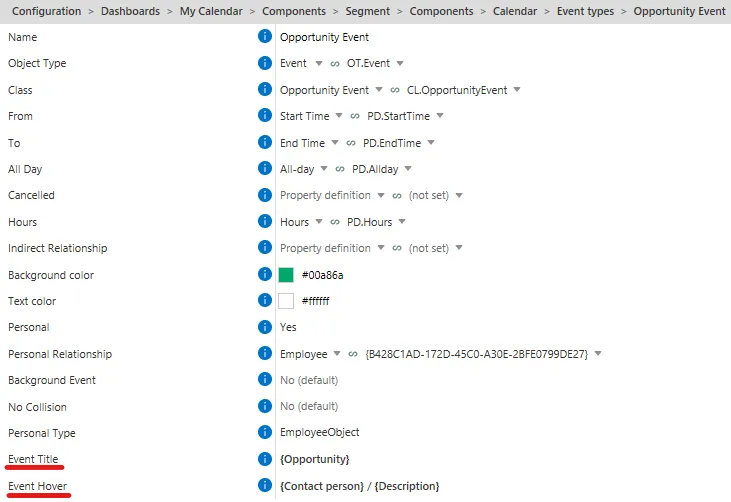
The opportunity event type in the CtrlPortals configuration. Event title and Event hover decide what an event says on the grid and what appears when somebody points at it. Both take property placeholders, added from the settings icon on the right.
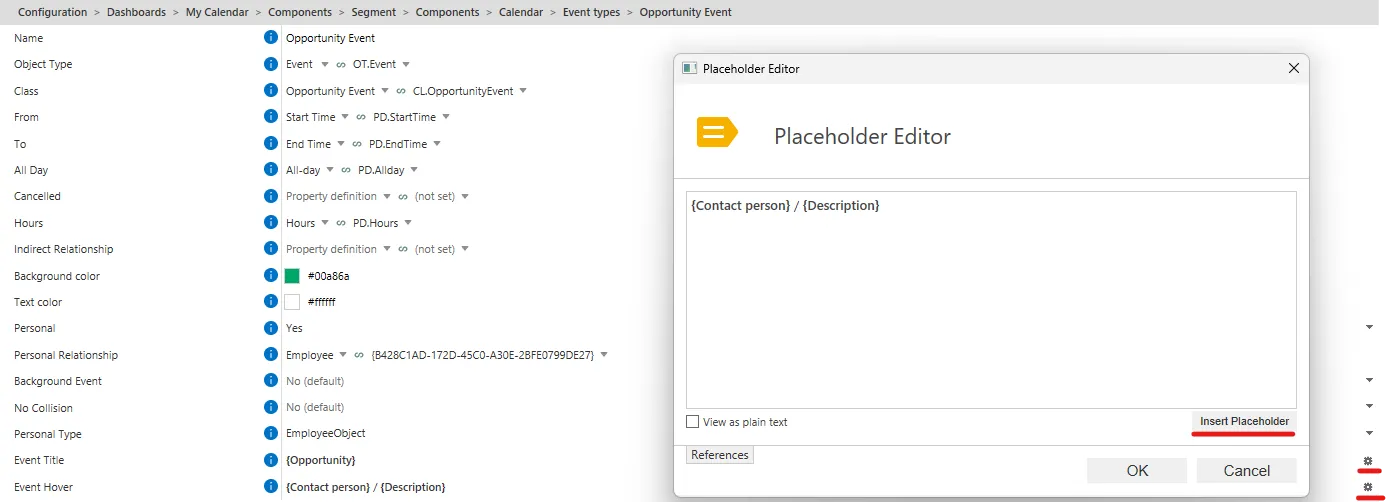
Adding a property placeholder to the event hover text.
What you have now
Section titled “What you have now”An understanding of what a calendar does before you configure one: several event types on one grid, each a class of object, each filtered by who it belongs to and what it is attached to.
To build one from scratch, work through Add a calendar to a portal. For every setting a calendar has, see the Calendar component reference.
The configuration behind this demo
Section titled “The configuration behind this demo”The demo calendar is the My Calendar dashboard below. The whole configuration can be seen as
raw JSON by selecting the top of the hierarchy (CtrlPortals - VAF) and choosing the
Advanced tab. The JSON here is one entry in the Dashboards list, not a whole
configuration: pasted over the Advanced tab as it is, it would replace everything else.
{ "Title": "My Calendar", "Components": [ { "Type": "Segment", "Components": [ { "Type": "Calendar", "EventTypes": [ { "Name": "Meeting", "BackgroundColor": "#5e5cb2", "TextColor": "#ffffff", "Hours": "PD.Hours", "AllDay": "PD.Allday", "ToDate": "PD.EndTime", "FromDate": "PD.StartTime", "Class": "CL.Meeting", "ObjType": "OT.Event", "Personal": true, "PersonalProperty": "{B428C1AD-172D-45C0-A30E-2BFE0799DE27}", "PersonalType": "EmployeeObject", "EventHoverText": "%PROPERTY_{PD.MeetingAgenda}%", "EventTitle": "%PROPERTY_{PD.EventType}% - %PROPERTY_{6F185E79-FC77-4FD3-ACC8-97630E10058B}%" }, { "Name": "Internal Meeting", "BackgroundColor": "#5C85B2", "TextColor": "#ffffff", "Hours": "PD.Hours", "AllDay": "PD.Allday", "ToDate": "PD.EndTime", "FromDate": "PD.StartTime", "Class": "CL.InternalMeeting", "ObjType": "OT.Event", "Personal": true, "PersonalProperty": "{B428C1AD-172D-45C0-A30E-2BFE0799DE27}", "PersonalType": "EmployeeObject", "EventHoverText": "%PROPERTY_{PD.MeetingAgenda}%\n", "EventTitle": "%PROPERTY_{3E2BB7EB-C49E-4C8C-825C-CAE0AEBA9A06}%" }, { "Name": "Project Event", "ObjType": "OT.Event", "Class": "CL.ProjectEvent", "FromDate": "PD.StartTime", "ToDate": "PD.EndTime", "AllDay": "PD.Allday", "Hours": "PD.Hours", "BackgroundColor": "#01796f", "TextColor": "#ffffff", "Personal": true, "PersonalProperty": "{B428C1AD-172D-45C0-A30E-2BFE0799DE27}", "PersonalType": "EmployeeObject", "EventHoverText": "%PROPERTY_{D317AF75-ED3B-4EF4-ADB0-ECB706E26F83}%", "EventTitle": "%PROPERTY_{8EE4E8A6-157F-4A5B-8A8E-D716444BCC5D}%" }, { "Name": "Opportunity Event", "ObjType": "OT.Event", "Class": "CL.OpportunityEvent", "FromDate": "PD.StartTime", "ToDate": "PD.EndTime", "AllDay": "PD.Allday", "Hours": "PD.Hours", "BackgroundColor": "#00a86a", "TextColor": "#ffffff", "Personal": true, "PersonalProperty": "{B428C1AD-172D-45C0-A30E-2BFE0799DE27}", "EventTitle": "%PROPERTY_{402F87FE-5223-4E44-9E84-11CD3A055094}%", "EventHoverText": "%PROPERTY_{6F185E79-FC77-4FD3-ACC8-97630E10058B}% / %PROPERTY_{PD.MeetingAgenda}%", "PersonalType": "EmployeeObject" }, { "Name": "Sales Event", "ObjType": "OT.Event", "Class": "CL.SalesEvent", "FromDate": "PD.StartTime", "ToDate": "PD.EndTime", "AllDay": "PD.Allday", "Hours": "PD.Hours", "BackgroundColor": "#3498db", "TextColor": "#ffffff", "Personal": true, "PersonalProperty": "{B428C1AD-172D-45C0-A30E-2BFE0799DE27}", "PersonalType": "EmployeeObject", "EventTitle": "%PROPERTY_{PD.Purpose}%", "EventHoverText": "%PROPERTY_{D317AF75-ED3B-4EF4-ADB0-ECB706E26F83}%" }, { "Name": "Unavailable", "BackgroundColor": "#ff6961", "TextColor": "#d1d1d1", "Hours": "PD.Hours", "AllDay": "PD.Allday", "ToDate": "PD.EndTime", "FromDate": "PD.StartTime", "Class": "CL.Unavailable", "ObjType": "OT.Event", "Personal": true, "PersonalProperty": "{B428C1AD-172D-45C0-A30E-2BFE0799DE27}", "PersonalType": "EmployeeObject", "EventTitle": "%PROPERTY_{CEBF9AC9-C60C-4240-9F50-723DBF3A5CA7}%", "EventHoverText": "%PROPERTY_{PD.StartTime}% - %PROPERTY_{PD.EndTime}%", "NoCollision": true }, { "Name": "Working Hours", "BackgroundColor": "#ff61a8", "TextColor": "#ffffff", "Hours": "PD.Hours", "AllDay": "PD.Allday", "ToDate": "PD.EndTime", "FromDate": "PD.StartTime", "Class": "CL.WorkingHours", "ObjType": "OT.Event", "Personal": true, "PersonalProperty": "{B428C1AD-172D-45C0-A30E-2BFE0799DE27}", "PersonalType": "EmployeeObject", "EventTitle": "%PROPERTY_{CEBF9AC9-C60C-4240-9F50-723DBF3A5CA7}% ", "EventHoverText": "%PROPERTY_{PD.EventStart}% %PROPERTY_{PD.EventEnd}%", "NoCollision": false, "IsBackgroundEvent": true }, { "Name": "Work Block", "BackgroundColor": "#FFBC6A", "TextColor": "#ffffff", "Hours": "PD.Hours", "AllDay": "PD.Allday", "ToDate": "PD.EndTime", "FromDate": "PD.StartTime", "Class": "CL.WorkBlock", "ObjType": "OT.Event", "Personal": true, "PersonalProperty": "{B428C1AD-172D-45C0-A30E-2BFE0799DE27}", "PersonalType": "EmployeeObject", "EventTitle": "%PROPERTY_{3E2BB7EB-C49E-4C8C-825C-CAE0AEBA9A06}%", "EventHoverText": "%PROPERTY_{D317AF75-ED3B-4EF4-ADB0-ECB706E26F83}%", "NoCollision": false }, { "Name": "Work from Home", "BackgroundColor": "#6affbc", "TextColor": "#c9c9c9", "Hours": "PD.Hours", "AllDay": "PD.Allday", "ToDate": "PD.EndTime", "FromDate": "PD.StartTime", "ObjType": "OT.Event", "Personal": true, "PersonalProperty": "{B428C1AD-172D-45C0-A30E-2BFE0799DE27}", "PersonalType": "EmployeeObject", "EventTitle": "%PROPERTY_{3E2BB7EB-C49E-4C8C-825C-CAE0AEBA9A06}%", "EventHoverText": "%PROPERTY_{D317AF75-ED3B-4EF4-ADB0-ECB706E26F83}%", "NoCollision": false, "Class": "CL.WorkFromHome" } ], "Height": 1000 } ] } ]}